

Enabling Alerts for Failed Invoice Submission to ZATCA
Last updated:
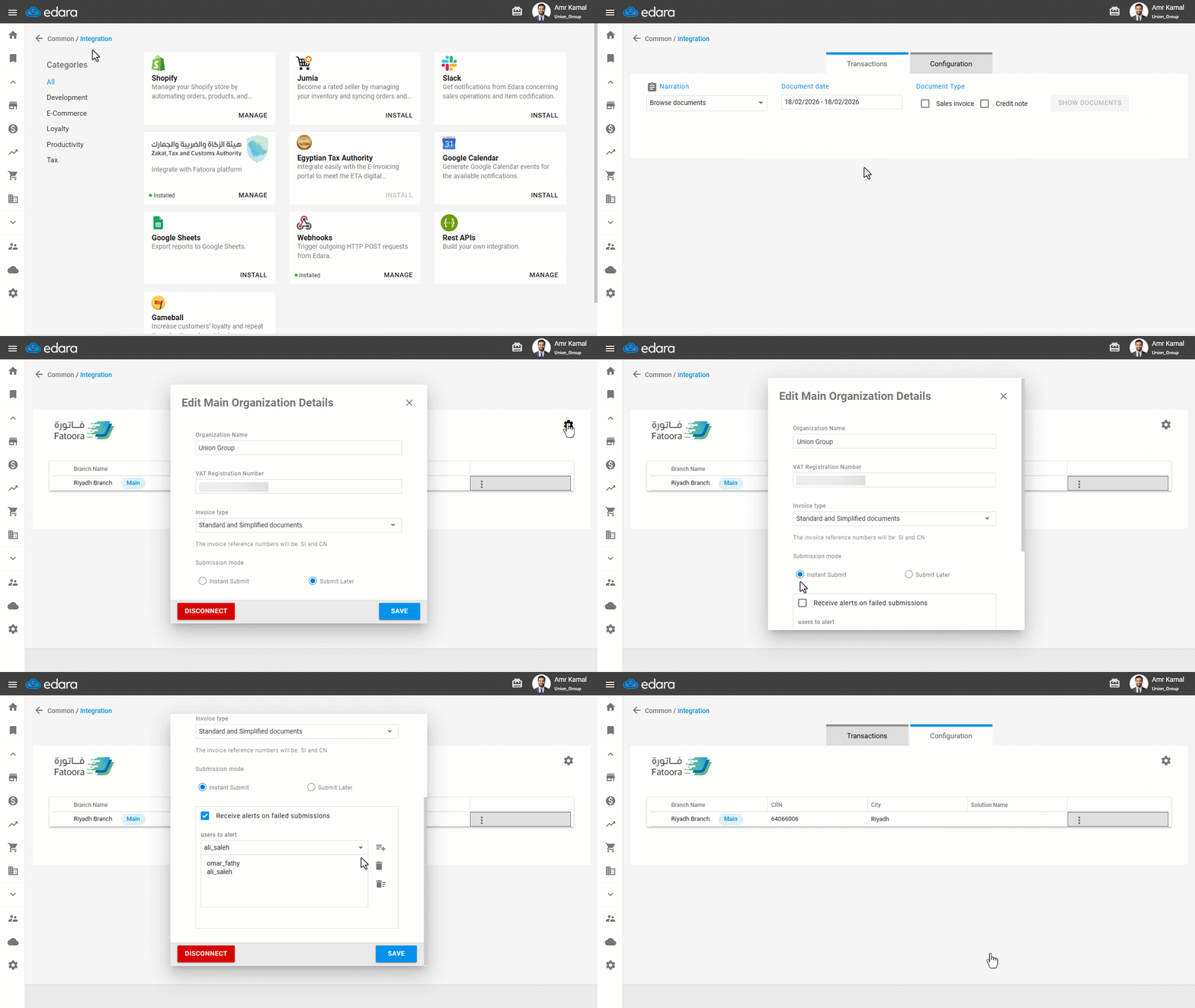
When using instant invoice submission to the Zakat, Tax, and Customs Authority (ZATCA), the submission may fail due to technical issues or data errors. To help you stay informed and easily follow up on unsubmitted invoices, the system allows you to enable the “Receive alerts on failed submissions” option to receive instant notifications via email and easily follow up on unsent invoices.
Enabling Alerts for Failed Invoice Submission to ZATCA

- Go to “Data”.
- Open the “Integration” page.
- Click on “manage” under “Zakat, Tax and Customs Authority”.
- Go to “Configuration”
- Click on the “Settings” icon.
- Ensure that the submission mode is “Instant Submit”.
- Enable the “Receive alerts on failed submissions ” option.
- Select the users to whom you want to send alerts.
- Click on “Save”.
If you encounter any challenges or have questions during these processes, you can contact our technical support team, who are ready to assist you at any time.
Did this answer your question?