

Activating the Business Intelligence Module
Last updated:
Business Intelligence(BI) is a module that helps you understand your daily data more clearly and turn it into reports that support analysis and decision-making across both management and operations.
The Business Intelligence module is available within the Ultimate plan and can be activated directly from the system at any time, without the need for technical intervention.
Activating the Business Intelligence Module

Before you start, make sure that you have access to the “Modules Activation” page and that your subscription supports the Business Intelligence module.
- Go to “Settings”.
- Open the “Modules Activation” page.
- Enable the “Business Intelligence” module.
A confirmation window will appear to verify your request.
- Type “Confirm”.
- Click on “Confirm”.
A message will appear stating that you will receive an email once the setup is complete within 24 hours.
- Click on “Got it”.
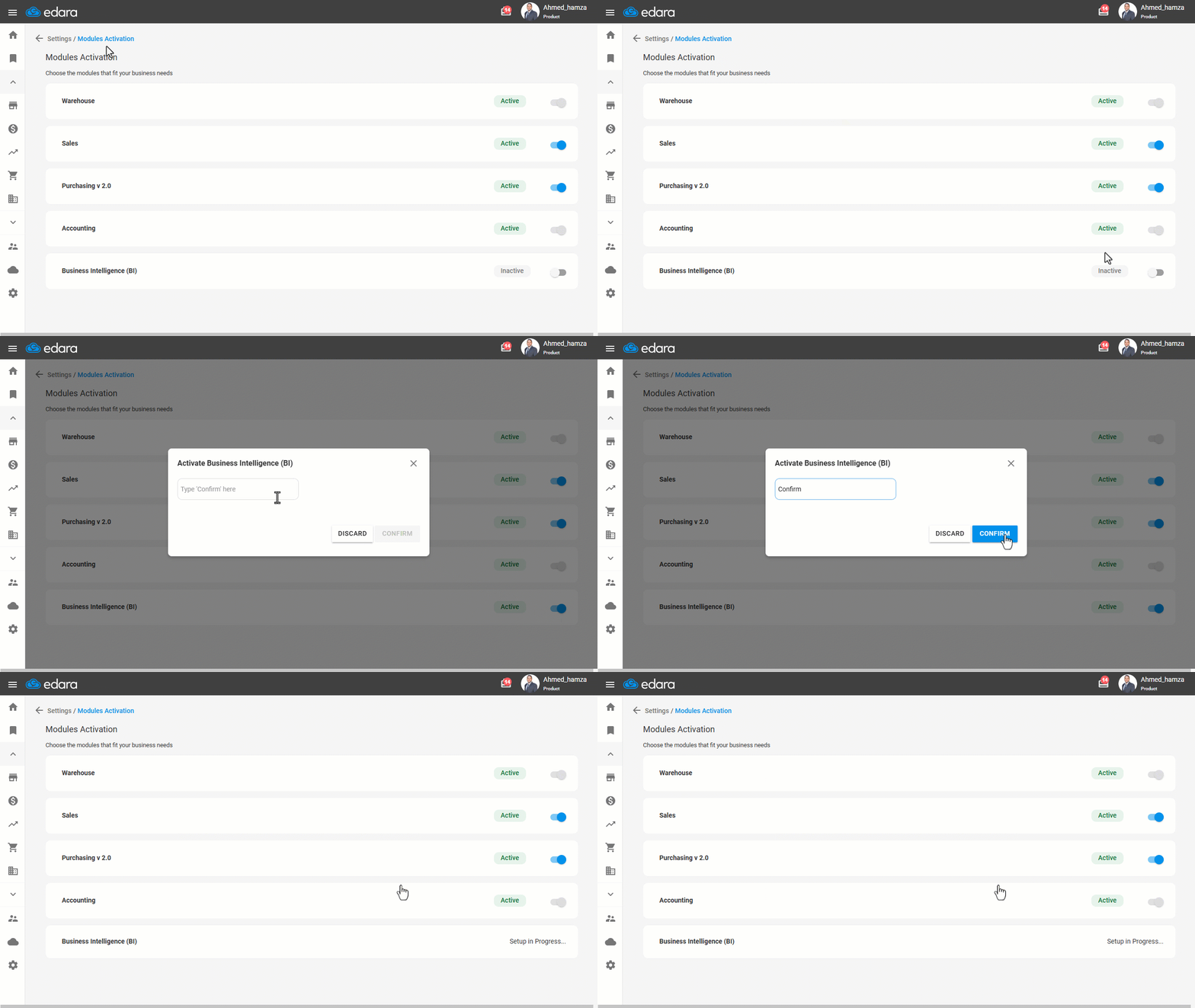
After confirming the activation, the system will automatically start preparing the technical infrastructure required to run Business Intelligence reports. This process may take up to 24 hours, and in most cases it is completed in a shorter time.
Once the setup is complete, the module is activated automatically within the system, and you will receive an email notifying you that the activation has been completed.
Notes:
- The Business Intelligence module is inactive by default and is activated only upon request. If your current subscription does not support this module, a notification will appear asking you to upgrade before completing the activation.
- After the activation is completed, it is recommended to log out of the system and log in again.
Frequently asked questions
How long does activating the Business Intelligence module take?
After confirming the activation, the system will automatically start preparing the technical infrastructure required to run Business Intelligence reports. This process may take up to 24 hours, and in most cases it is completed in a shorter time.
If you encounter any challenges or have questions during these processes, you can contact our technical support team, who are ready to assist you at any time.