

Importing Purchase Orders Lines “3.0” from Sales Orders “2.0”
Last updated:
When your workflow starts with a customer’s sales order, you can import its items straight into the purchase order. This saves time and eliminates manual entry efforts, especially with large orders.
Importing Purchase Orders Lines “3.0” from Sales Orders “2.0”

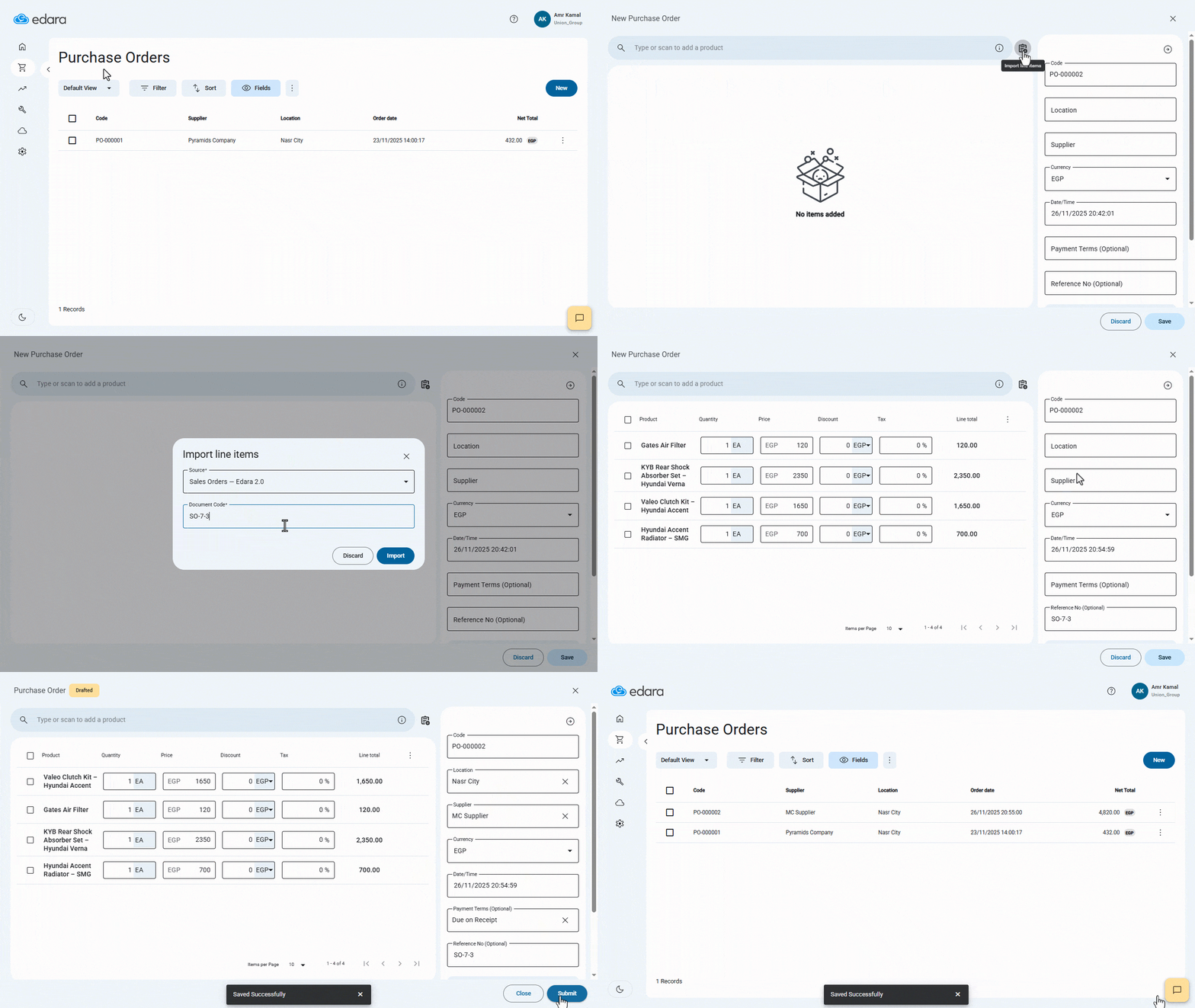
- Go to the “Purchasing” module.
- Open the “Purchase Orders" page.
- Click on “New”.
- Click the “Import line items” icon.
A window will appear for importing order lines, with the default source set to “Sales Orders – Edara 2.0”.
- Copy the Sales Order Code you want to import from Edara 2.0.
- Paste the Sales Order Code into the “Document Code” field.
- Click on “Import”.
- Click on “Got it”.
After importing the sales order lines, the Sales Order Code will be added to the “Reference No.” field inside the purchase order. You can then modify any additional purchase order details as needed.
- Click on “Save”.
- Click on “Submit”.
If you encounter any challenges or have questions during these processes, you can contact our technical support team, who are ready to assist you at any time.
Did this answer your question?