

Displaying the Closure Summary
Last updated:
After reviewing the Register Closures Report in the POS module, you may want to dive deeper into the details of each shift recorded for a cash register.
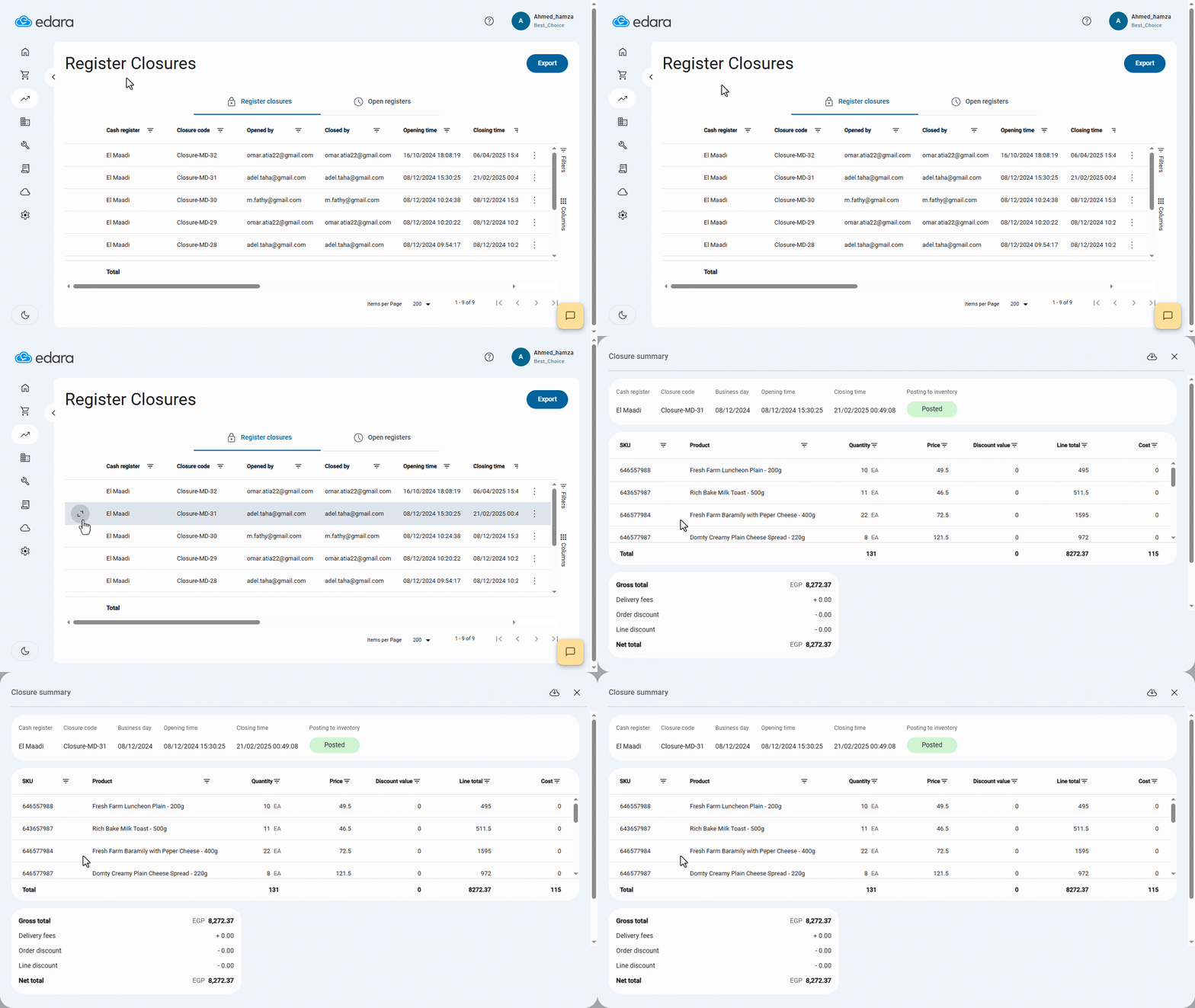
The Closure Summary provides a detailed breakdown including: (Product name - SKU - Quantity - Price - Discount Value - Cost - Gross Sales - Delivery fees - Net Total).
Displaying the Closure Summary
- Go to the POS module.
- Open the “Register Closures” page.
- Hover over the register closure you want to view, then click on “
 ” to open its closure summary.
Once done, the summary will display all detailed shift data as shown in the screenshot below:
Note: You can export the Closure Summary to Excel by clicking on the Export button “ ”.
”.
Frequently asked questions
Can I export the closure summary to Excel?
You can export the Closure Summary to Excel by clicking on the Export button “ ”.
”.
If you encounter any challenges or have questions during these processes, you can contact our technical support team, who are ready to assist you at any time.