

Converting a Journal Entry into a Recurring Journal Entry
Last updated:
If you have a journal entry with multiple accounts and details and need to create a recurring entry with the same data, you don’t have to re-enter everything manually. Instead, you can convert the existing journal entry into a recurring journal entry in just a few steps, saving time and effort.
Converting a Journal Entry into a Recurring Journal Entry
Ensure that the feature "Allow saving (Sales/Purchase/Accounting) documents in future date" is enabled in the Module Settings page, Then follow these steps:
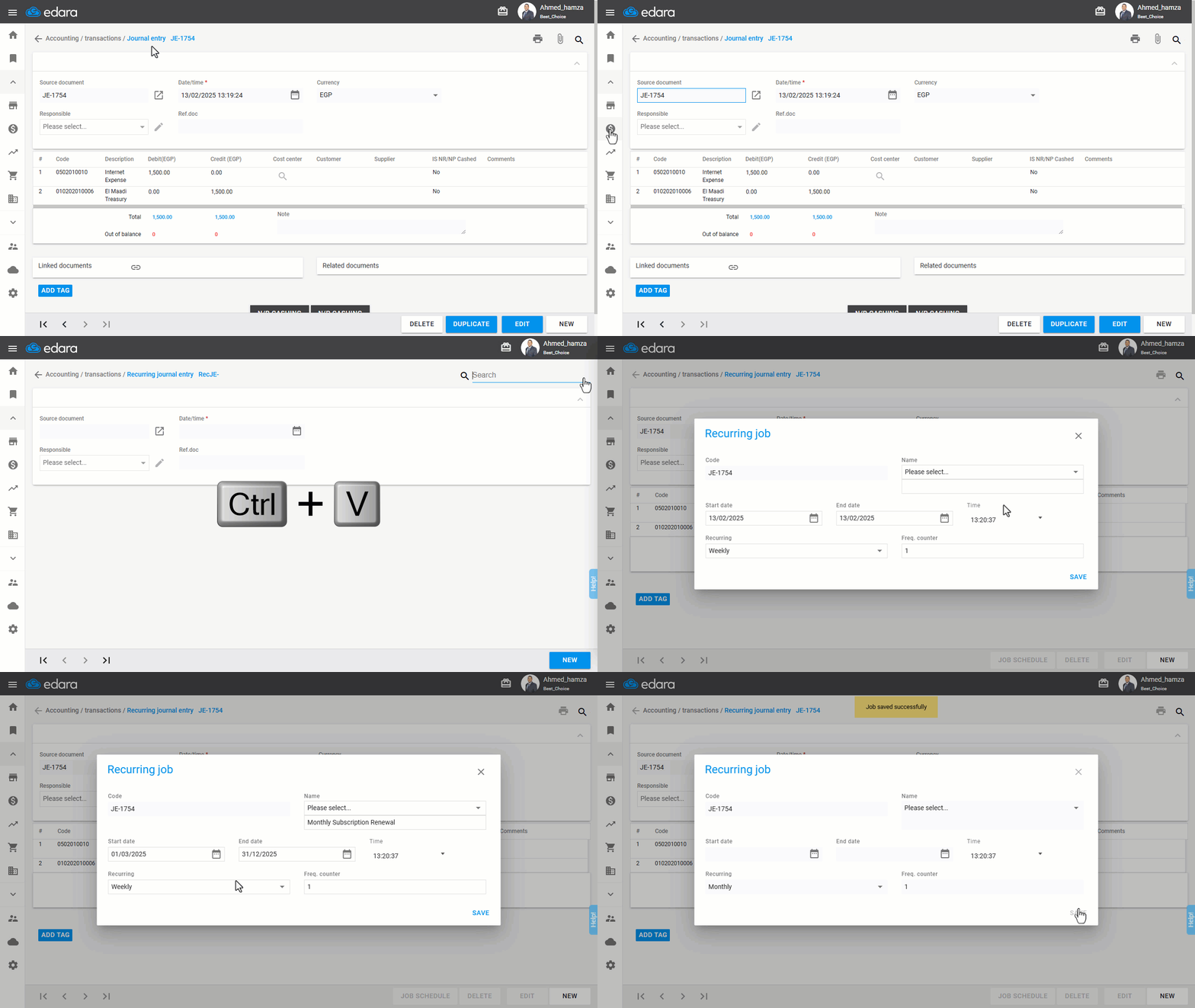
- Go to the Accounting module.
- Open the “Journal Entry” page.
- Copy the journal entry number that you want to convert.
- Open the “Recurring Journal Entry” page.
- Paste the copied number into the search field.
- Press "Enter" on your keyboard.
- Click on "Job Schedule".
- Enter the job name.
- Specify the start date, end date, Recurring, and the Freq. counter.
Note: The start date must be set in the future to successfully create the recurring entry.
- Click "Save".
Note: For more details, refer to the article: Creating a Recurring Journal Entry.
If you encounter any challenges or have questions during these processes, you can contact our technical support team, who are ready to assist you at any time.