

Viewing the Vertical Financial Statement Report
Last updated:
The vertical financial statement provides a comprehensive view of key financial reports such as the balance sheet and income statement, enabling you to assess profit and loss.
Viewing the Vertical Financial Statement Report
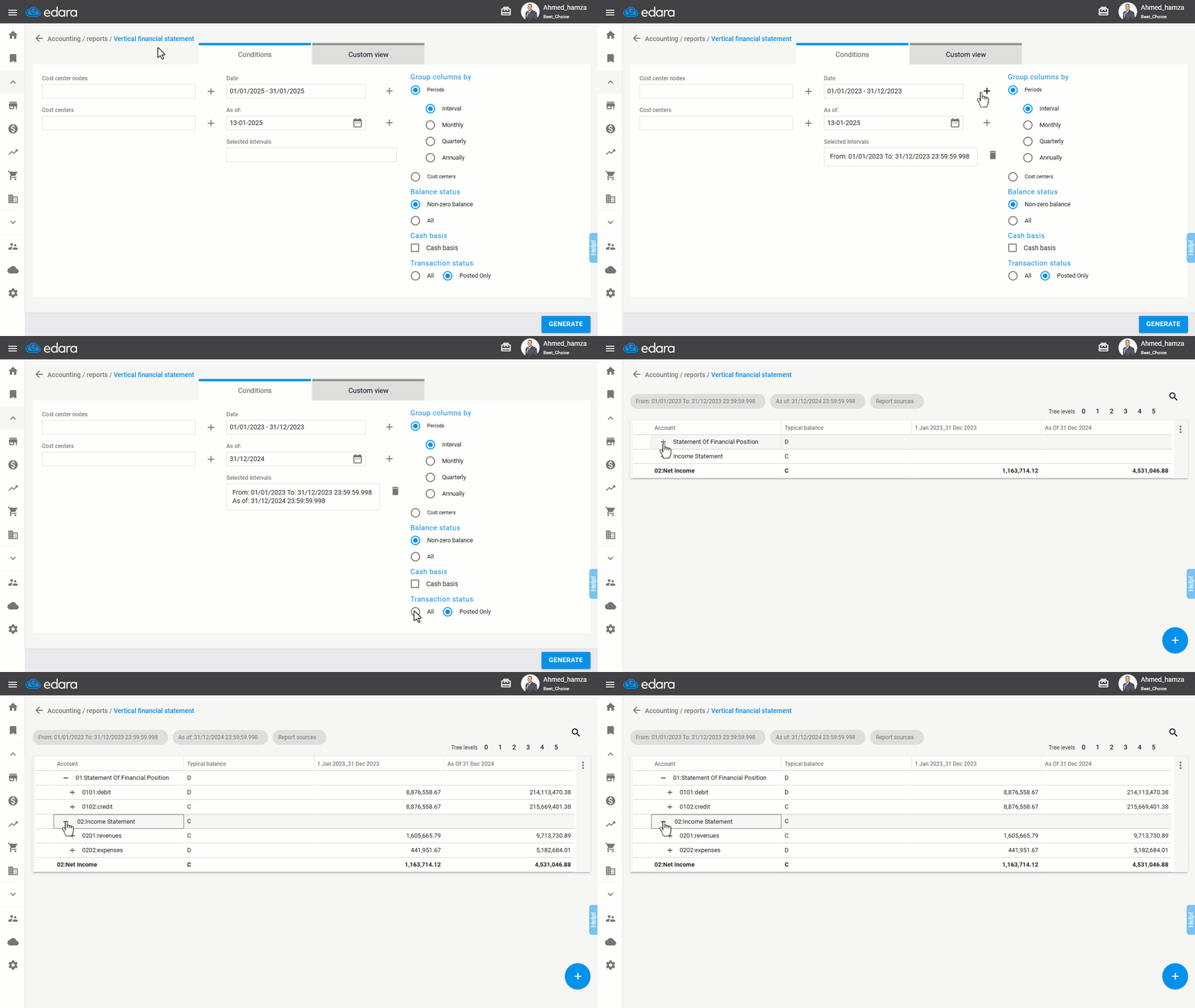
- Go to the “Accounting” module.
- Open the “Vertical FS” page.
- Specify the required period by clicking the “+” icon.
- Select the end date (To Date) by clicking the “+” icon.
Note: Accurate date selection is crucial for obtaining correct results. Follow these guidelines:
- Specify the required period (From-To) for accurate results in the income statement report.
- Set the end date (To Date) for accurate results in the balance sheet report.
- Select the Transaction status: (All).
- Click “Generate”.
Frequently asked questions
What is the difference between setting the period and setting the end date?
Accurate date selection is crucial for obtaining correct results. Follow these guidelines: Specify the required period (From-To) for accurate results in the income statement report, Set the end date (To Date) for accurate results in the balance sheet report.
If you encounter any challenges or have questions during these processes, you can contact our technical support team, who are ready to assist you at any time.
Did this answer your question?