

Setting Suppliers Payment Terms
Last updated:
Managing supplier invoices requires accurate visibility of payment due dates. By assigning payment terms to each supplier, the system can automatically calculate the due date when creating a purchase invoice, without the need to enter it manually.
Setting Suppliers Payment Terms

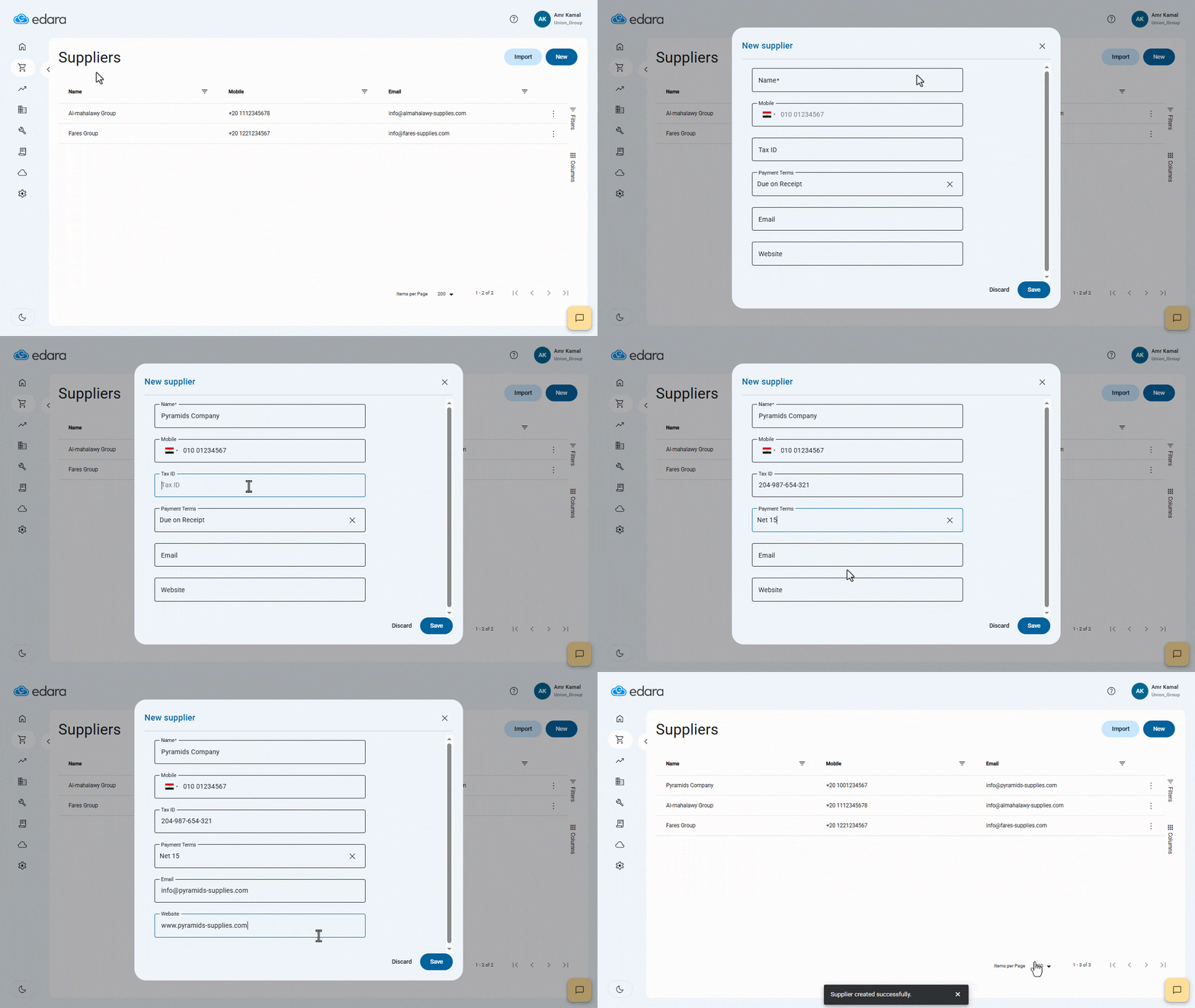
- Go to the “Purchasing” module.
- Open the “Suppliers” page.
- Click on “New” to create a new supplier.
Note: You can edit the payment terms for an existing supplier by clicking the More Details icon “⁝” and selecting “Edit”.
- Fill in the supplier’s details, including:
- Name (Required)
- Mobile (Optional)
- Tax ID (Optional)
- Payment Terms (Required): Select the appropriate terms from the list, such as Due on Receipt, Net 7 Days, Net 14 Days, etc.
- Email (Optional)
- Website (Optional)
- Click on “Save”.
Notes:
- When selecting the supplier inside a purchase order, the system automatically applies the default payment terms saved in the supplier’s details. You can modify these terms inside the purchase order if the transaction is an exception, without affecting the supplier’s default setting.
- When converting the purchase order into a purchase invoice, the system uses the PO payment terms to calculate the invoice due date automatically, based on the invoice date and the selected terms — no manual entry required.
Frequently asked questions
How is the due date calculated in the purchase invoice?
When converting the purchase order into a purchase invoice, the system uses the PO payment terms to calculate the invoice due date automatically, based on the invoice date and the selected terms — no manual entry required.
If you encounter any challenges or have questions during these processes, you can contact our technical support team, who are ready to assist you at any time.