

Resubmitting Invalid Documents to the E-Receipt Portal
Last updated:
After browsing the E-Receipt documents and identifying the rejected ones, you can modify them to meet the requirements and resubmit them to the E-Receipt Portal.
"Edara" enables you to perform this action; the steps are detailed below.
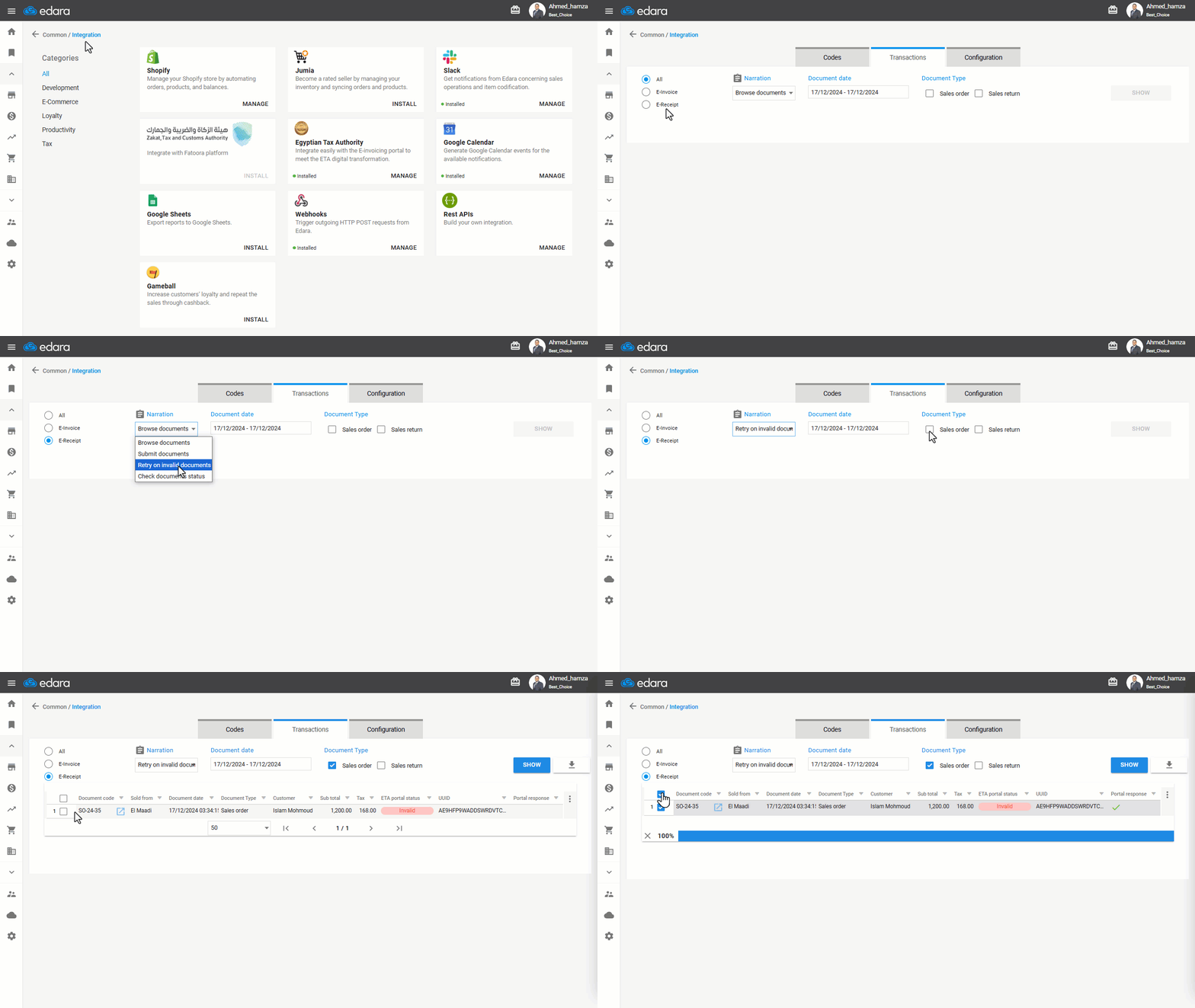
Resubmitting Invalid Documents to the E-Receipt Portal
- Go to Data Module.
- Open the Integration page.
- Click on “Manage”.
- Choose “E-Receipt”.
- Select the Narration as “Retry on Invalid Documents”.
- Specify the date of the documents you want to resubmit.
- Choose the document type.
- Click “Show”.
- Select the invalid invoices you wish to resubmit.
- Click “Resubmit”.
Note: You can download the invoices as an Excel file by clicking “ ”.
”.
If you encounter any challenges or have questions during these processes, you can contact our technical support team, who are ready to assist you at any time.
Did this answer your question?