

Displaying Sales by Product in the Analytics module
Last updated:
The Sales by Product component helps you monitor the performance of each product in detail, including quantities sold and returned, revenues, refunds, costs, and gross profit. You can also use the component to easily filter data by product or any other conditions to review performance and make informed decisions.
Displaying Sales by Product in the Analytics module
- Go to the "Analytics" module.
- Open the dashboard where you want to display the component or create a new dashboard.
Note: If the Sales by Product component does not appear on the dashboard, you can click on the "+" at the top of the screen, then click on the "+" next to Sales by Product to add it to the dashboard.
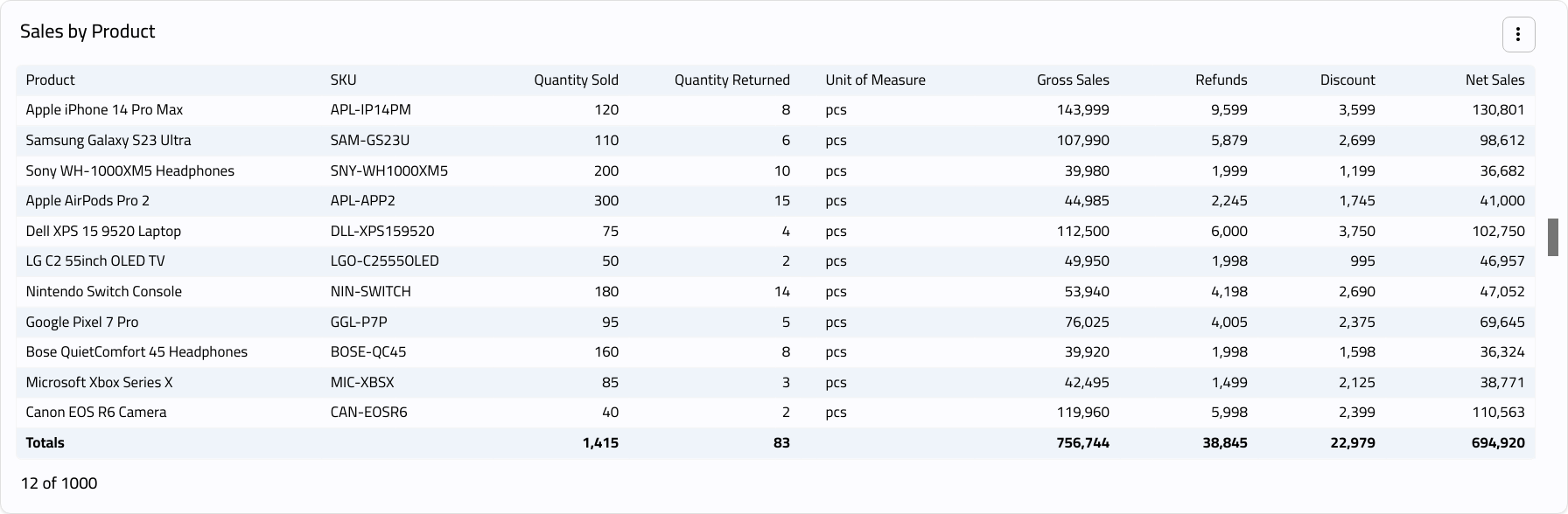
Modifying the Sales by Product Component
- Click on "︙".
- Click on "Edit".
- Click on "Add Condition" to add the filters you need.
- Go to "Sort".
- Select the column and sorting method.
- Click on "Add Another Sort" to add additional sorting options for the component.
- Go to "Fields".
- Click on "
 " to control whether a field is displayed or hidden.
 - Click on "
 " next to a field and drag it up or down to control the order of fields within the component.
 - Click on “Save”.
If you encounter any challenges or have questions during these processes, you can contact our technical support team, who are ready to assist you at any time.
Did this answer your question?