

Excluding Users from Enforcing Custom Field Entry
Last updated:
Enforcing custom fields ensures data completeness within the system, but it may also cause incoming orders from e-commerce platforms to fail if they do not include the required fields. Therefore, you can exclude integration users from this requirement while keeping it applied to other users to maintain accurate operations across warehouses and sales stores.
Excluding Users from Enforcing Custom Field Entry

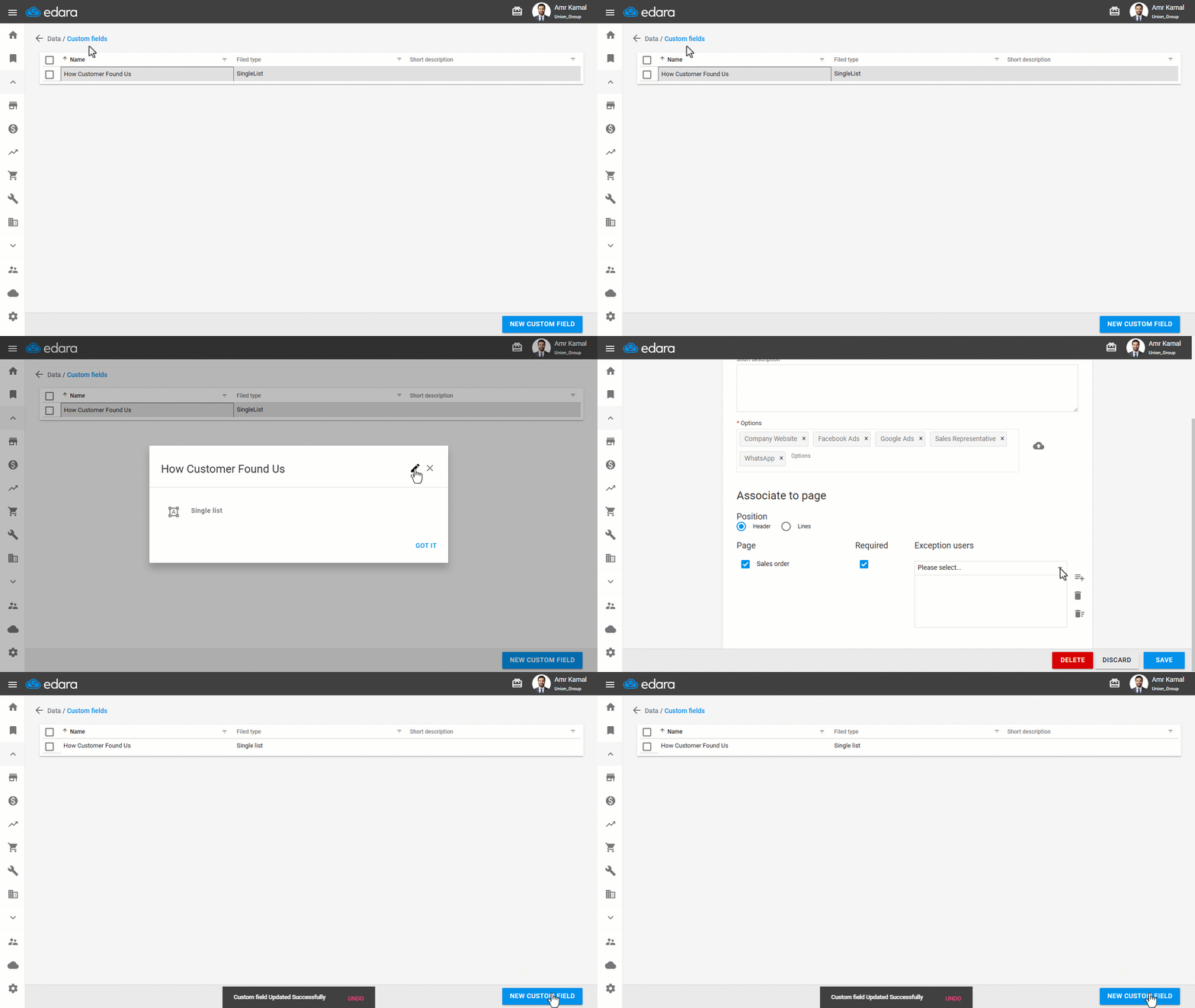
- Go to the “Data”.
- Open the ”Custom Fields” page.
- Click on the required custom field.
- Click on the edit icon “
 ”.
”. - Select the exception users.
- Click on “Save”.
Note: You can also exclude specific users from custom fields when creating a new custom field in a sales order or within the sales order details.
If you encounter any challenges or have questions during these processes, you can contact our technical support team, who are ready to assist you at any time.
Did this answer your question?